Circus of the Lost
ASSIGNMENT
Game Jam #02 - 10 seconds
Group: Eris Mardy, Lily Ahmad-Davis, Kianna Bulawan.
My Roles: Coding/all unity aspects
DESCRIPTION
We decided to make a hidden object game with a creepy clown/circus theme.
Disclaimer: all art shown was done by Eris Mardy, Lily Ahmad-Davis, and Kianna Bulawan.
Date
Semester 1 2024 - week 4 to week 5
GAME FILES
Click here to play
Download entire folder, open HiddenObjectText02.exe to play


Full Playthrough
Scripts
I followed these tutorials by Design and Deploy to make the base game while i was waiting for the assets to be made
Click Control
This was attached to each of the hidden objects in the scene.

Remain items set to 5 because I knew that number wouldn’t change, we had 5 items to find
Success click is the particle system that lights up in a ring around objects once they are found, and success icon lights up around the icon on the notepad
pairedObj is the next object to find. The objects are found in the same order each time
Turns off the collider on the hidden items and the icon that will appear in the notebook. HatObject is excluded because that was the first one to find

When the current findable object is found, destroy Object gets called after 1 second.
Object in the scene gets turned grey as well as the icon in notepad. In the tutorial, they destroyed the object after it was found, however I didn't want to do that.
2 seconds gets added to the time when an object is successfully found
This resets the number of click so only 5 UNSUCCESSFUL clicks in a row results in a penalty, not 5 clicks in total.
This turns on the sparkle around the found object in the scene
This turns on the icon on the notepad and the collider on the next object so it is now clickable.
Destroys the previous icon in the notepad
This is what happens when an object is found
Tracking Clicks
This was attached to the background
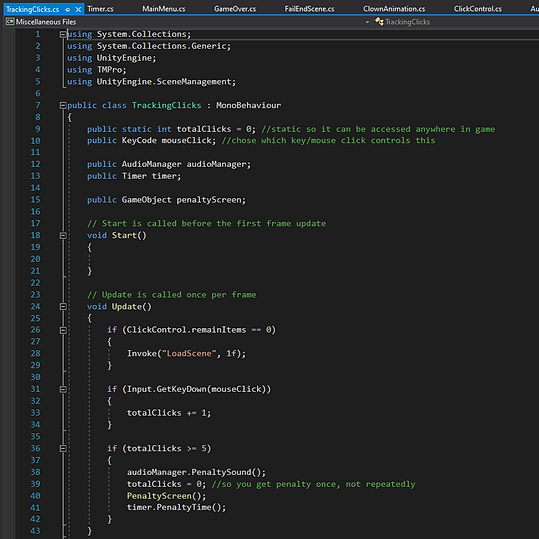
If the player finds all the items before the time runs out, LoadScene is called after a 1 second delay
When the mouse is clicked, totalClicks increases by 1
When the total clicks reaches 5, the penalty sound is played, the total clicks gets set back to 0 so you only get the penalty once and not for every next click. Penalty screen is called, and the penalty time is called.

Penalty screen is a function that turns on the penaltyObj (a red vignette), and destroys it once the penalty sound has finished playing.
Load Screen simply loads the win scene. I had to do it like this so I could make it wait for a second.
This is the penalty screen
Timer

Sets the current time left to the total time I set in the inspector. This allowed me to easily adjust the time
If there is more than 0 seconds on the timer, UpdateTimerDisplay is called, and the time left is reduced.
If there is 0 seconds left, the fail screen will load
UpdateTimerDisplay controls how the timer works. This makes it work in accurate seconds
AddTime is called when the player successfully finds an object
PenaltyTime is called when the player clicks 5 times in a row unsuccessfully
Demonstrating both AddTime and PenaltyTime
Win End Scene

If the player finds all the objects in time, this gets called. It loads the win screen
Main Menu

Script for the buttons on the main menu

Game Over

Turns off the buttons on the end scene, so only the jump scare is visible Then after 2 seconds, EndScreen is invoked
End screen causes the jump scare to turn off and the buttons to turn on .
Fail End Scene
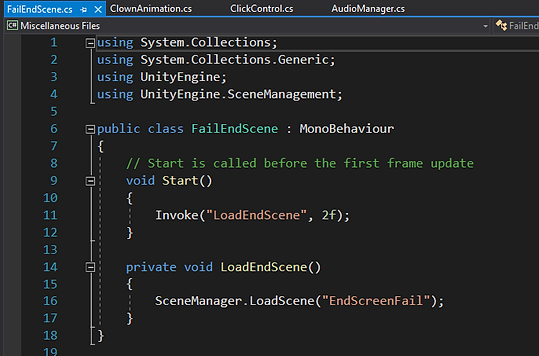
If the player fails to find all the objects in time, this gets called. It loads the fail screen after 2 seconds
Clown Animation

Quick script for the clown jumpscare in the fail end scene. Makes the head spin
Audio Manager

Audio source was started in the title scene and continued throughout the game
When a sound effect was called, it would play for the length of the sound then be destroyed
To control the sliders in the title screen (followed Masaya's tutorial) I didn't end up putting the sliders in the game, but it was good to know how to make them
This would get called when the player got a penalty
Reflection:
I'm happy with how the game turned out. We stuck to the theme of 10 seconds and all collaborated really well. By only working on the coding and technical aspects of this game, I got to really focus and I learnt a lot. I definitely improved a lot since the previous game jam, I understand the whole process a lot better now.
Things to change:
-
I know I could condense the scripts down a lot. This would be necessary if this was a real game since it is important to ensure the game runs smoothly. However, for this small game it was fine.
-
I would randomize the order of finding the objects. In this one, it is hard-coded to run in a specific order. I would like to challenge myself and it would also make it more engaging for players if the objects weren't found in the same order every time.
-
I would add an options button on the home to allow the players to change the volume. Some people may find the sound effects too loud.